Thursday, February 17, 2022

Nagios - monitoring for read-only disks


Introduction

When Linux or Unix systems encounter an error on a file system, it will generally remount it as read-only to prevent further damage. This happens regularly with BTRFS file systems. We need to know about this before issues arise.

The SNMP arcs hrStorage and dskTable report on storage and disks, but they do not indicate the writable status of a mount point.

The best available solution for an SNMP-only implementation of this is to use the SNMP extend mechanism to invoke a server-side script, and send the results of that as SNMP values.

Method

Server-side script

I started with an existing Nagios script as the server-side script. This had a dependency on the Perl module Utils.pm, however it was just a couple of definitions which I hard-coded into the script:

1# hard-code these in for machines without Nagios plugins installed - pyarra 2#use lib "/usr/lib/nagios/plugins"; 3#use utils qw (%ERRORS &support); 4my %ERRORS=('OK'=>0,'WARNING'=>1,'CRITICAL'=>2,'UNKNOWN'=>3,'DEPENDENT'=>4); 5 6sub support () { 7 my $support='Send email to help@monitoring-plugins.org if you have questions regarding use\nof this software. To submit patches or suggest improvements, send email to\ndevel@monitoring-plugins.org. Please include version information with all\ncorrespondence (when possible, use output from the --version option of the\nplugin itself).\n'; 8 $support =~ s/@/\@/g; 9 $support =~ s/\\n/\n/g; 10 print $support; 11}

This script is then deployed at /usr/local/bin/check_ro_mounts and given execution permissions for all users.

Server-side snmpd configuration

Edit /etc/snmp/snmpd.conf and insert config to tell snmpd to call this script:

1extend fsro /usr/local/bin/check_ro_mounts -X tmpfs

Note we are excluding filesystems of type tmpfs, as these are expected to be present read-only. Other types of filesystem may need to be added using repeated -X if they’re found.

Restart snmpd:

1service snmpd restart

Testing with snmpget

Initially I’d considered getting these extend sections to be rooted at our company's arc using our existing PEN from IANA. However using the SNMP NET-SNMP-EXTEND-MIB::nsExtendObjects proved to make interrogating the results much easier, as the user-provided name index (such as fsro) can be used to get at values.

There are two values that are particularly useful for us:

nsExtendResult: an integer value, where 0 means OK, and 2 means read-only mounts were found

nsExtendOutputFull: a string representation. If an unexpected read-only mount is found, it is listed in this output.

Here’s an example of what we expect when things are okay:

1$ snmpget -cpublic -v2c gctssle02 'NET-SNMP-EXTEND-MIB::nsExtendResult."fsro"' 'NET-SNMP-EXTEND-MIB::nsExtendOutputFull."fsro"' 2NET-SNMP-EXTEND-MIB::nsExtendResult."fsro" = INTEGER: 0 3NET-SNMP-EXTEND-MIB::nsExtendOutputFull."fsro" = STRING: RO_MOUNTS OK: No ro mounts found

Note the weird quoting that is absolutely required to make this work!

Now let’s simulate a failure - we’re going remove the server-side config that excludes tmpfs file systems:

Change this line in /etc/snmp/snmpd.conf:

1extend fsro /usr/local/bin/check_ro_mounts -X tmpfs

to:

1extend fsro /usr/local/bin/check_ro_mounts

Restart snmpd on the server:

1service snmpd restart

… And re-query using snmpget from the monitoring host:

1$ snmpget -cpublic -v2c gctssle02 'NET-SNMP-EXTEND-MIB::nsExtendResult."fsro"' 'NET-SNMP-EXTEND-MIB::nsExtendOutputFull."fsro"' 2NET-SNMP-EXTEND-MIB::nsExtendResult."fsro" = INTEGER: 2 3NET-SNMP-EXTEND-MIB::nsExtendOutputFull."fsro" = STRING: RO_MOUNTS CRITICAL: Found ro mounts: /sys/fs/cgroup

Great! The integer value for nsExtendResult is 2, and the nsExtendOutputFull value tells us the read-only mount point we found was /sys/fs/cgroup

Now restore your original server-side config to exclude tmpfs, and restart snmpd.

Creating Nagios checks

We’ll start by calling the Nagios command-line tools initially, to confirm that the techniques we used for snmpget will work. We want the check_snmp tool for this, as it allows us to check arbitrary SNMP values.

First, we’ll check that the integer value works as expected - anything above 0 will be CRITICAL :

1$ check_snmp -H gctssle02 -o 'NET-SNMP-EXTEND-MIB::nsExtendResult."fsro"' -c 0 2SNMP OK - 0 | 'NET-SNMP-EXTEND-MIB::nsExtendResult."fsro"'=0

Second, we check that we can parse the string value - we’re looking for it to contain “OK”, using a regex:

1$ check_snmp -H gctssle02 -r 'RO_MOUNTS OK' -o 'NET-SNMP-EXTEND-MIB::nsExtendOutputFull."fsro"' 2SNMP OK - RO_MOUNTS OK: No ro mounts found |


Now let’s simulate failure to make sure our checks fail as we expect. Again, we’re going to modify the server-side snmpd.conf to not exclude tmpfs filesystems.

First, check that the non-zero integer value causes a critical alert:

1$ check_snmp -H gctssle02 -o 'NET-SNMP-EXTEND-MIB::nsExtendResult."fsro"' -c 0 2SNMP CRITICAL - *2* | 'NET-SNMP-EXTEND-MIB::nsExtendResult."fsro"'=2

Second, check that the absence of “OK” in the string output causes an alert:

1$ check_snmp -H gctssle02 -r 'RO_MOUNTS OK' -o 'NET-SNMP-EXTEND-MIB::nsExtendOutputFull."fsro"' 2SNMP CRITICAL - *RO_MOUNTS CRITICAL: Found ro mounts: /sys/fs/cgroup* |

Excellent! We could theoretically use just one of these, however integer parsing is a safer way to alert to the presence of an error, and the string representation gives us useful information in case of an alert, so we’ll configure both.

Now let’s put these into Nagios. First, we’ll create the commands in /etc/nagios3/commands.cfg:

1define command{ 2 command_name check_readonlyfs_int 3 command_line /usr/lib/nagios/plugins/check_snmp -H '$HOSTADDRESS$' -o 'NET-SNMP-EXTEND-MIB::nsExtendResult."fsro"' -c 0 4} 5 6define command{ 7 command_name check_readonlyfs_str 8 command_line /usr/lib/nagios/plugins/check_snmp -H '$HOSTADDRESS$' -r 'RO_MOUNTS OK' -o 'NET-SNMP-EXTEND-MIB::nsExtendOutputFull."fsro"' -s OK 9}

Now assign these checks to a host:

1define host{ 2 use generic-host ; Name of host template to use 3 host_name gctssle02 4 alias GC SUSE test server 5 address gctssle02 6 contact_groups admins 7 _SNMP_COMMUNITY public 8 } 9 10define service{ 11 use generic-service 12 host_name gctssle02 13 service_description Read-only filesystem int 14 check_command check_readonlyfs_int 15 check_interval 5 16} 17 18define service{ 19 use generic-service 20 host_name gctssle02 21 service_description Read-only filesystem str 22 check_command check_readonlyfs_str 23 check_interval 5 24}


Reload Nagios:

1sudo service nagios3 reload

Simulate failure:


And check that it works for success:


Thursday, July 11, 2019

Home automation on the cheap, part one

The challenge: automate things around the home, as cheaply as possible.


Back when I started work in IT, home automation was The Next Big Thing that never actually became big. At the time, X10 was the standard of choice, and though there was no way I was spending that kind of money and effort to have my home re-fitted with X10 controllers, I kinda liked the idea. It speaks to my inner nerd.

Roll forward 20+ years, and home automation is suddenly achievable for not too much money or effort. And with voice control!

My initial goal was to have a voice-controlled replacement for my Logitech Harmony universal remote.

Image result for logitech harmony

Being kind-of an audio nerd, I like having the TV sound played through the stereo in the lounge - far better sound than the TV's tinny little speakers. Thing is, it can be hard for every member of the household to remember to turn on the amp and the TV, or which buttons to press to hear TV sound, or the CD player, or the turntable... so the Harmony universal remote's "scenes" function was a great way to turn on the stereo, turn on the TV, switch the stereo's input to the TV, adjust the volume to something sane. Thing is, the Harmony's interface was kind of a pain to use, especially since it relied on having a Windows computer handy to program it. Not great for a Linux household.

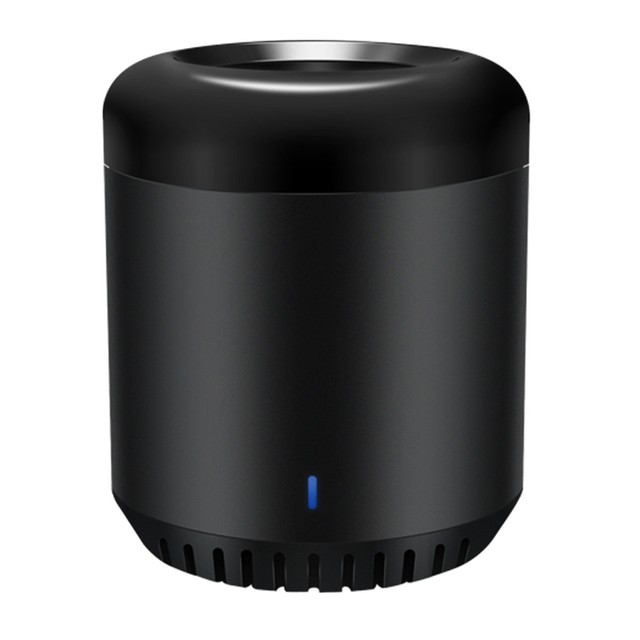
I started with a Google home mini, waiting till they were on sale at Officedorks for AUD$45. I added a Broadlink Mini 3 for infrared control of the TV and stereo - that cost about $30.
BroadLink RM Mini3 Smart Wi-Fi IR Remote Controller Smart Home Automation Black

Obviously, your appliances you wish to control must have infrared controls.

At this point I had a capable replacement for the Logitech Harmony. The IHC iPhone app to control the Broadlink was pretty straightforward. You add appliances that the Broadlink can control, then build up scenes... pretty close to how the Harmony worked.


See the pauses between commands? It took a bit of experimentation to get these right... the amp does not respond to having IR commands fired at it too quickly! And if it's just been turned on, it goes through a period where it's not responding... hence the wait times are required. 


Once these scenes are set up, you link your Broadlink account to your Google assistant's account, and all the scenes are visible to Google. So you can say "OK Google, activate watch TV" and it All Just Works. Mainly.

Why "mainly"? Because infrared controls don't have "turn the amp on" or "turn the amp off" signals. It's a power toggle - if it's off, it turns on; if it's on, it turns off. So if your TV and amp get out of step - one is on and one is off - then your scene "Watch TV" will turn one off and one on. So you end up needing scenes called "TV On" and "Amp On" to bring them back into step. Or you resort to using the amp's remote control, or... (horror of horrors!) actually walk over and use the buttons! To make matters worse, the amp's power button is a "hard off" so you couldn't turn the amp back on by infrared if someone had pressed it to turn the amp off. Yeesh!

I ended up replacing the amp with a Denon that still uses infrared, but has separate IR commands for on and off. Also, the Denon sounds beautiful - a really massive improvement over the previous amp. Gotta love Facebook marketplace for cheap second-hand stereo gear! Anyway... this means that for home automation, we can tell the amp to "turn on" which solves one issue. Actually two: I no longer need a graphic EQ to correct the sound of a crappy amp. One less appliance in the lounge room!

Logitech Bluetooth Audio Adapter

I then added a Logitech Bluetooth receiver (about $45) - I stream audio to this from my phone, so I can play Spotify (and podcasts) to it. Works a treat! One little issue... the receiver is always on, so as soon as my phone is in range, it starts streaming the sound to the bluetooth receiver. However, the amp might be off, or receiving sound from the TV input, but my phone doesn't know that... it's just merrily sending audio and I never get to hear it. So what I needed was a way to turn the Bluetooth receiver on only when I'm listening to the Bluetooth input on the amp. Sounds like a candidate for a scene where I turn on the amp, turn on the bluetooth receiver, and select the bluetooth input on the amp... like this!


So, how do we turn on the power to the bluetooth receiver? At the time I set this up, wifi powerpoint controllers were expensive, so I ended up getting some wireless remote controllers like this:
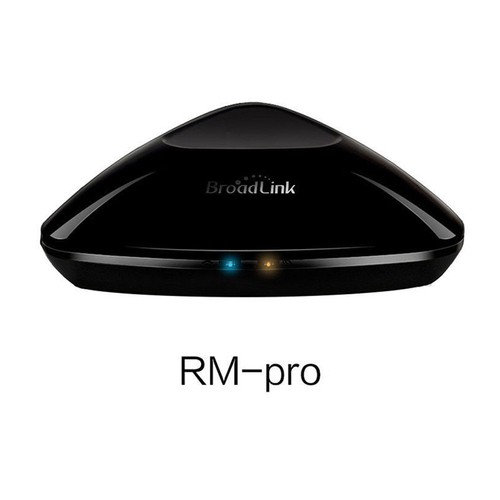
They're cheap, readily available, and pretty good (more later on why they're not "great"). They use the 433 MHz band for their communication, and it works pretty well through walls, along the length of my house. But since the goal here is to automate them, we need a way to control them. Turns out the Broadlink RM Pro incorporates infrared and 433 MHz, so it can control those. I picked one up online for about $35, and it replaced the Mini:

Original-Broadlink-RM-PRO-Home-Remote-Control-WIFI-IR-RF-Switch-Via-IOS-Android
Plug the power adaptor for the Bluetooth reciver in to one of the wireless power controllers, train the Broadlink as to which controller is which:


... and hey presto, we can turn on the bluetooth reciver as part of a scene (and also turn it off as part of a scene called "Bluetooth off"). Yay!

Since the wireless powerpoint controllers come in multiple packs, I used the additional controllers to plug in a few lamps, and now we also have "OK Google, turn on the loungeroom lamps". Further happiness!

So why are the wireless controllers not great? There are two issues: 
  1. the controller for one batch of these interferes with the others... so turning off the loungeroom lights also turns off the bedroom lamp. That's annoying!
  2. they don't have a manual button to control them. You have to use either the Google automation, or the remote control they come with. I'd really prefer a button on them to switch power on or off if needed
Roll forward to the present day, and suddenly there are really cheap wifi-enabled power controllers with power buttons on them. Perfect! I recently acquired this for the princely sum of $15:


It works absolutely fine, setup was easy, and the USB charger port is a nice touch. Its iPhone app makes setup of the controller easy, then link to it from Google and hey presto! Voice control, or optionally, use the Google Assistant app.

Now it seems like Arlec are making their own equivalent. At $32 for a twin-pack at Bunnings, these also look promising, though I haven't yet set these up:


No doubt I'll need another iPhone app to set them up... but once it's set up and linked to Google, I'll never use the app again, so I don't mind. 


The final thing I'd really like to automate is the heating controls... that's a whole 'nother issue. Look out for that in Part 2, if I ever get that working!

Oh, and now I have so many wifi devices hanging off it, the Modem Of Incredible Cheapness is having a hissy fit every 3 days or so. The struggle is real.

Monday, September 11, 2017

NSClient++ and registry keys to allow arguments

Setting up new NSClient++ on WIndows servers, trying to check the status of just one service, ut keep getting the dreaded :

Exception processing request: Request contained arguments (not currently allowed, check the allow arguments option).

SO plenty of people out there with hints for this, but they all involve editing the .ini file - great, except I used the registry method to configure NSClient++. Hmmm. Clint Boessen's blog pointed me in the right direction - set the config key "allow arguments = 1" so I did the closest thing I could think of in the registry, and it worked. Cool:


Wednesday, February 3, 2016

Email from Solaris to Exchange distribution groups

So yes, I need to send email, via mailx, from Solaris boxes, to Exchange distribution groups. Seemed like a better way than embedding a bunch of email addresses into my scripts. Seemed so simple. So wasn't.

I tested:

w | mailx -s "test to one email" me@mywork.com.au

And it works fine.

Then I created an Exchange distribtution group, with me as the sole member, and tested:

w | mailx -s "test to group" DST-Pinnacle_Backups-ROV@mywork.com.au

Didn't work. Why?

The trick turns out to be that Exchange distribution groups have, by default, a setting that requires senders to "authenticated" - this seems to mean "part of my Windows domain" - in that they have to be authenticated as Windows users. Clearly, sendmail on Solaris isn't going to to meet this criterion.

The solution: open properties for the distribution group, and click the "MailFlow Settings":


Then double-click "Message Delivery Restrictions":


Un-select "Require that all senders are authenticated". Simples!


Wednesday, May 20, 2015

Space out on Solaris 10

Removing spaces from file names... seems like everyone has their own way to do it. Here's what I ended up putting in my Solaris 10 ~/.bashrc :

function despace()
{
    while IFS='' read FILE
    do
        NEWFILE=`echo "$FILE" | sed -e 's/ /_/g'`

        if [ "$FILE" = "$NEWFILE" ]
        then
            echo "No spaces detected in [$FILE]"
            continue
        fi

        if [ -e "$NEWFILE" ]
        then
            echo "$NEWFILE already exists, not going to overwite it"
        else
            echo "Renaming [$FILE] to [$NEWFILE]"
            mv "$FILE" "$NEWFILE"
        fi
    done
}


Use the command like this:

$ ls * | despace
Renaming [CT.SABR test 5.1.dcm] to [CT.SABR_test_5.1.dcm]
Renaming [CT.SABR test 5.10.dcm] to [CT.SABR_test_5.10.dcm]
Renaming [CT.SABR test 5.100.dcm] to [CT.SABR_test_5.100.dcm]

If a file by the name we're changing to already exists, it will not get over-written:

$ ls * | despace
Renaming [CT.SABR_test_5.1.dcm] to [CT.SABR_test_5.1.dcm]
CT.SABR_test_5.1.dcm already exists, not going to overwite it

The IFS='' is needed to catch trailing spaces on filenames (I know, no sane person would do that, but included for the sake of completeness). If you pass it filenames without spaces, it tells you and skips them.

Note: on Linux you can use rename, but that doesn't live on Solaris 10 by default, and I'm working with the tools I have